The 8 best family habit tracking apps in 2026 (tested with real kids)
We tried the leading family habit and chore apps with our own kids. Here's an honest comparison of HabitShare, Joon, Habitica, FamiLAMI, OurHome, Cozi, Samsung Family Hub — and Family Habits, which we built ourselves.
By Jon Horton ·

Every parent who has tried to track a family’s habits has the same drawer in their kitchen: a star chart half-filled in, a printed chore wheel curling at the edges, an app that looked perfect for two weeks and then went silent. The problem isn’t motivation. It’s that most tools were built for one person tracking one habit — not for a household with two parents, three kids, and a Tuesday that keeps not going to plan.
We spent the last two months living inside the leading family habit tracking apps, looking for the one our family would actually keep using past the third week. This is what we found.
If your search is narrower — chores specifically, including the allowance-first apps like Greenlight and BusyKid — we ranked that field separately in the best chore apps for families.
One disclosure before we start: we built one of these apps. It’s called Family Habits, and yes, we ranked it first. Read the criteria below before you decide whether that’s fair — we set them up to be honest about what makes a family tracker stick, not to flatter our own work. The other seven are real options; some are better than ours for certain families, and we’ll say so when they are.
How we evaluated each app
A good family chore chart app has to survive a few brutal tests that single-user habit apps never face. We graded each tool against six things:
- Multi-kid support. Can two or more kids share the app without stepping on each other? Can each one have their own goals?
- Parent oversight without bottlenecks. Can a parent verify what actually got done — without becoming the all-day referee?
- Shared-device mode. Most families use a tablet on the kitchen counter. Does the app work in that “kiosk” mode without making every kid log in?
- Co-parent sync. If both parents tap “done,” does the app handle it gracefully? Or does someone get double-credit and someone else get an argument?
- Rewards that don’t collapse. The points loop has to mean something past week two — without turning your house into a bribery economy.
- Cross-platform. Web, iOS, Android. Because the family device is rarely the same one from day to day.
We didn’t weight gamification highly. Heavy game layers thrill kids for about ten days and then become work for the parent. We did weight visibility — the thing that turns nagging into rhythm, which we wrote more about in why shared visibility beats nagging.
Quick comparison
| App | Best for | Multi-kid | Parent approval | Kiosk mode | Co-parent sync | Free tier |
|---|---|---|---|---|---|---|
| Family Habits | Habit-first families with shared device | Yes | Yes (approval queue) | Yes (built-in) | Yes (real-time) | Yes |
| Joon | ADHD kids, ages 6–12 | Yes | Yes | No | Limited | Trial only |
| Cozi | Calendar-first family organizing | Yes | No | No | Yes | Yes |
| OurHome | Free chore split, older UI | Yes | Yes | No | Yes | Yes |
| FamiLAMI | Gamified habits (virtual pet) | Yes | Yes | No | Yes | Yes (limited) |
| HabitShare | Social habit accountability | Limited | No | No | Yes | Yes |
| Habitica | RPG fans, mostly solo adults | No | No | No | Limited | Yes |
| Samsung Family Hub | Samsung-fridge households only | Yes | No | Fridge-only | Yes | Hardware-locked |
1. Family Habits — best overall for families that want habits to stick
This is the app we built. We started it because the apps below either treated kids like miniature adults trying to gym-rat their way to better routines, or treated chores like a transactional allowance machine. Neither matched how habits actually form in a house.
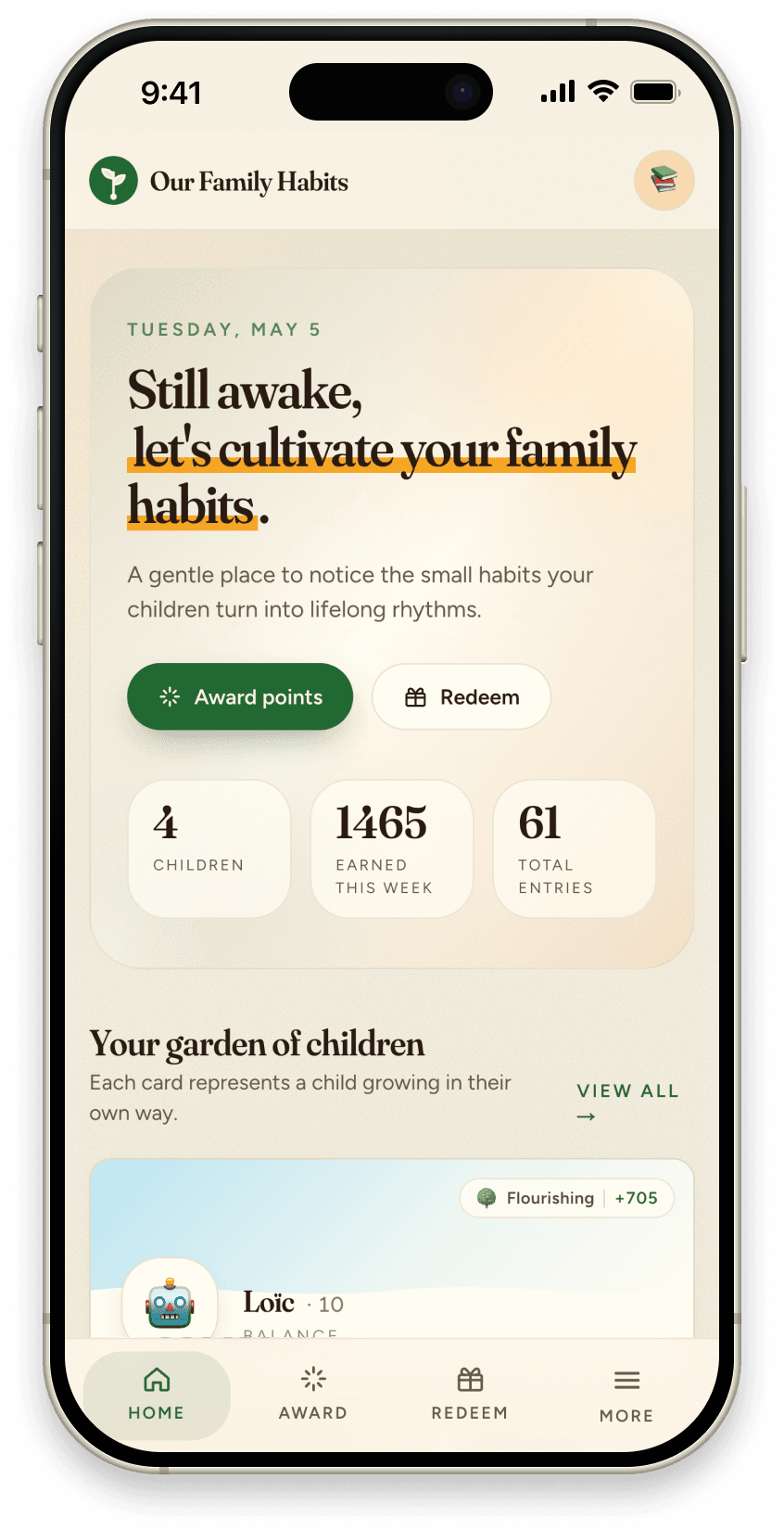
What it is. A web + iOS + Android app where parents set the daily actions that matter, kids tap them off on a shared tablet, and a parent approval queue keeps the points honest. Earned points roll into rewards the kid actually wants — screen time, an outing, a small allowance, whatever you set. A weekly digest shows you what’s holding and what’s slipping.
Best for. Families with two or more kids who want a habit-first system — not just a chore chart, not just an allowance tracker.
Pros. Real kiosk mode for the family tablet so kids log themselves in with a tap. Approval queue means a kid can’t award themselves 50 points for “read for an hour” without a parent checking. Both parents see the same state, and the app coalesces notifications so you don’t get pinged twelve times in a row. Clean, calm UI — not a casino of confetti.
Cons. Newer than the others on this list, so the community is smaller. No deep gamification layer (intentional — see why sticker charts stop working for why we made that call). No grocery list or shared calendar — we’re not trying to be Cozi.
Pricing. Free tier covers most small families. Paid tier unlocks weekly digest email, push notifications, and multi-device features.
2. Joon — best for ADHD kids ages 6–12
What it is. A quest-based mobile game where chores and routines become missions for a virtual pet. Built specifically with input from child psychologists, with ADHD families in mind.
Best for. Younger kids (roughly 6 to 12) who need a heavy gamification layer to engage at all — especially kids with ADHD, where the dopamine loop of the quest mechanic does real work.
Pros. Genuinely well-designed game layer. Therapists like it. Kids in the target age range stay engaged longer than with most “chore” apps. The clinical pedigree shows.
Cons. Narrow age range — an 11-year-old’s younger sibling will love it; their 14-year-old sibling will roll their eyes. Subscription is on the higher end. No shared-device mode — each kid uses their own phone or tablet, which doesn’t fit families running a single counter tablet. Parent setup is significant before the game makes sense.
Pricing. Roughly $10–15/month after a short trial. No permanent free tier.
3. Cozi Family Organizer — best when calendar matters more than habits
What it is. The mass-market family organizing app. Shared calendar, grocery lists, meal planner, basic to-do tracking. Habits are a bolt-on, not the point.
Best for. Families whose actual pain is calendar coordination — “who’s picking up who, when” — rather than habit formation.
Pros. Mature product, decades old. Free tier is generous. Co-parent sync works well. Calendar is the best on this list by a wide margin.
Cons. The habit/chore tracking is rudimentary. No parent approval. No kiosk. No real rewards system. If habits are why you’re shopping, this isn’t the right tool — even though Cozi will keep coming up in search results for “family habit app.”
Pricing. Free with ads; Gold tier removes ads and adds birthday/contact tracking.
4. OurHome — best free chore split for older kids
What it is. A free family app focused on chore splitting, shopping lists, and basic rewards. Older UI, but functional and stable.
Best for. Families with tweens and teens who want a no-cost chore tracker without a lot of bells and whistles. Especially good if your kids already have their own phones.
Pros. Truly free. Multi-kid. Chores can have point values. Parent approval is supported. Shopping list integration is a nice touch.
Cons. The UI feels stuck around 2017. No real habit framing — chores are chores, nothing more. No kiosk mode. Push notifications are basic. The product hasn’t evolved much in recent years, which is fine if you want stability and a warning sign if you want anything new.
Pricing. Free.
If OurHome is close but not quite right for your family, we go deeper on the specific gap in OurHome alternatives.
5. FamiLAMI — best when a kid needs a game to engage
What it is. A gamified habit and routine app that turns chores into a quest — kids care for a virtual pet, explore locations, build streaks, and complete tasks from ready-made habit sets (chores, study, sports, self-care). Strong visual design, very kid-friendly.
Best for. Younger children, or kids who won’t engage without a play layer — the virtual pet and quest map give them a reason to come back. Same idea as Joon, aimed a little broader.
Pros. Clean, modern app that kids genuinely enjoy. Ready-made habit lists mean you’re not starting from a blank screen. The game world does real work for the right child. Multi-kid, with progress history and parent reports.
Cons. The game layer is the motivator, so when the novelty fades the habit it was carrying can stall — and a parent ends up managing a second game economy. Rewards live mostly inside the app rather than in real life. It’s built around each kid’s own device and pet, so there’s no shared-tablet kiosk. And for screen-cautious families, gamifying everyday life is the opposite of what they want.
Pricing. Limited free tier; paid tier unlocks more.
6. HabitShare — best for adult accountability (not really kids)
What it is. A habit tracker built around social accountability — you share your habits with friends or family members who can see your streak.
Best for. Adult-to-adult accountability, like a couple tracking workouts together. Listed here because it gets recommended in family threads, not because it’s actually built for families.
Pros. Simple, fast, free. The shared-streak mechanic is genuinely motivating between adults.
Cons. No kid roles, no parent approval, no rewards system, no kiosk. Designed around individual habits shared between adults, not family rhythms with multiple kids. Try this with a 9-year-old and the model breaks down fast.
Pricing. Free.
7. Habitica — best for RPG-loving adults (rarely the right fit for kids)
What it is. A habit tracker dressed up as a turn-based RPG. You earn experience and gold for completing habits; you lose health for missing them. Parties of friends can quest together.
Best for. Adults (and the rare older teen) who genuinely love RPG mechanics and want to gamify their own habits.
Pros. Deep, fun gamification for the right user. Active community. Free.
Cons. Built around the individual, not the family. The interface is overwhelming for most kids — menus, stats, equipment slots. No parent approval. No multi-kid framing. Kids who don’t already love RPGs bounce within a week.
Pricing. Free; cosmetic and convenience upgrades available.
8. Samsung Family Hub — only if you already own the fridge
What it is. The family app that lives on Samsung’s Family Hub smart refrigerators. Calendar, notes, chores, family messages — on the appliance.
Best for. Households that already own a Samsung Family Hub fridge and want to use it.
Pros. Always on, always in the kitchen, no separate device to manage. Whole family walks past it daily.
Cons. Hardware-locked. The app outside the fridge is a thin companion. Habit tracking is shallow. If you don’t own the fridge, this isn’t an option — and if you do, you probably already have your habit tool figured out.
Pricing. Included with the fridge ($2,000+ hardware).
How to pick the right one for your family
A short decision tree:
- Calendar pain is your real pain? Cozi. Don’t over-think it.
- Kid with ADHD, ages 6–12? Try Joon first — the quest mechanic earns its price.
- Young kid who only engages through a game? FamiLAMI — the virtual pet and quests are the hook.
- Just want free chore tracking with older kids? OurHome.
- You and your spouse want to share workout streaks? HabitShare — but don’t use it for the kids.
- Want a habit-first system that survives multiple kids, a shared tablet, and two parents? That’s the gap we built Family Habits to fill.
If none of these fit, the honest answer is that the right tool might not be an app at all — it might be a shared kiosk on the wall and a simple weekly rhythm. We wrote about setting that up separately.
Frequently asked questions
What’s the best free family habit tracking app? For pure habit + chore tracking with multiple kids, Family Habits has the most generous free tier of any tool here that includes parent approval and kiosk mode. OurHome is fully free but the UI is dated and there’s no real habit framing.
Which family chore chart app is best for multiple kids? Family Habits, OurHome, and FamiLAMI all handle multi-kid well. Joon and Habitica are weaker here — they treat each child as a separate user rather than as part of a household.
Is there a habit tracker designed for kids with ADHD? Joon is the clearest pick for this. It was built with clinical input specifically for the ADHD profile, and the quest mechanic carries kids through the executive-function gap that breaks most chore apps.
Can I use one of these on a shared family tablet? Only Family Habits has a dedicated kiosk mode where kids can log in with a tap without typing passwords. The others all assume each user has their own device.
Do any of these handle co-parents without a mess? Family Habits, Cozi, OurHome, and FamiLAMI all support multiple parents on the same account. Family Habits and Cozi handle real-time sync cleanly; the others can occasionally show stale state until a refresh.
The bigger picture
The “best app” is the one your family actually opens on day forty — not the one that looked the most impressive on day one. The point isn’t the chart. The point is the rhythm underneath: kids who know what’s expected, parents who don’t have to repeat themselves, a house that runs on rails the family laid together.
That’s the bet behind Family Habits, and if it sounds like the gap you’ve been trying to close, try it free. If one of the other seven fits your family better, use that one — better that you actually use something than that you keep looking.